 Office 2008 for MacHomeandStudent Edition
 Office 2008 for Mac
  Office 2008 for MacSpecial Media Edition .
From work to home to school, your life is full—and you need to be ready for all of it. Microsoft Office 2008 for Mac helps you easily create and manage great-looking papers, presentations, and reports so that you can work smart instead of working hard.
Manage your notes and time with Notebook Layout View in Word 2008; use professional templates and polished graphics to create great-looking reports; and confidently share documents with friends and family—whether they are on a Mac or a PC.
Last month, I posted to Mac Mojo about Solver and Excel
2008, where I explained that the Excel team was working hard to bring Solver
functionality back for Office 2008 customers.
Today, I am delighted to
announce that Solver is definitely coming back to Excel 2008. This is
very, very, very good news for anyone that uses Excel for linear
programming or nonlinear optimization problems (Mac-using MBA students, I'm
looking at you...).
Here are the three things you should know:
site of Frontline Systems (www.solver.com/mac).
time for back to school!).
So how was this accomplished, and how
does it work?
Technical Approach
Developing a Solver for Excel
2008 presented some interesting technical challenges. In Excel 2004, Solver
relies on Visual Basic for Applications (VBA) to function. Since VBA is not a
part of Office 2008, we had to find a way of identifying those areas that needed
VBA and replacing them with something equivalent.
Many people don't
realize this, but Solver is not actually a Microsoft product. Rather, the Solver
code is owned and developed by a Nevada firm called Frontline Systems. Frontline
creates and sells a line of industrial-strength Solver products that are used in
commercial and government settings. Their basic, free version of Solver has
shipped with Excel for many, many years.
Frontline are the most
knowledgeable people on the planet when it comes to Solver, and, once MacBU
began hearing from customers about Solver's absence, we began working with
Frontline to figure out how to solve the problem (pardon the pun).
The
final solution was to package up Solver's functionality into its own Mac OS X
application, Solver.app, and then use AppleScript to communicate between Solver
and Excel. This approach is simple, elegant, uses proven Apple technologies, and
results in an experience that is very, very similar to that of using Solver in
Excel 2004.
(It's also worth pointing out that this approach required us
to 'eat our own dogfood' - Solver was developed using the same AppleScript
techniques we recommend for other developers who want to build on top of
Office 2008.)
How It Works
We have attempted to
make the process of obtaining and using Solver as simple as
possible.
Obtaining Solver
The process of downloading Solver is
(eerily!) similar to the process for getting any other Mac software off the
Internet:
folder you like).
That's it! You're all installed.
Using
Solver
Once Solver is on your machine, it's ready to start working with
Excel. To use Solver:
/Applications folder). Solver will open (see Figure 1).
in Excel to serve as constraints or targets, setting your options for the model,
and then clicking 'Solve'. Solver will attempt to solve the model and will let
you know if it finds a solution.
Figure
1 - Solver.app Running On Mac OS X
Next
Steps
As mentioned, above, Solver will be available as a free download
from Frontline's Web site by mid-September.
We will put up a notice right
here on Mac Mojo when the bits are available for download; if you read Mac Mojo
through RSS, you'll be notified very quickly (and if you don't get Mojo through
RSS, why not? Try Safari or NetNewsWire
for a great RSS experience). Frontline will also have an announcement on their
Web site.
I'd like to close on a personal note. One of the first things I
learned first-hand at Microsoft is that software is a team sport: nothing
happens in this business unless a lot of good people, each with their own unique
talents, work very hard to make it happen. This project (especially coming
together as quickly as it did) was no exception. In addition to the thanks owed
to my colleagues in Excel, all of us here at MacBU owe a huge "THANK YOU" to our
friends at Frontline Systems, who were above-and-beyond professional,
responsive, and just plain wonderful to work with.
So: Solver. Free
download. Mid-September. Watch this space for details.
August 2, 2008
Office 2008 for Mac + Any Mac = A Great Deal

1.3 Megapixel USB Digital Microscope

This 1.3 Megapixel Digital Microscope allows you to capture some higher resolution images and video and display them on your PC using a simple USB connection. View specimens collected around the house, backyard, your desk, or the fridge. Look at the micro-printing on a dollar bill or examine the traces on your motherboard. This microscope provides you an easy way to zoom in on a wide variety of objects to satisfy your curiosity of the world around you. Ever wondered what lint looks like or the mold growing on your week-old bagels? Now you can find out.

Simple plug and play operation with included software that allows you to magnify objects and view them on your PC up to 200X and take snapshots and time-lapse movies. You can also manipulate images with drawing and painting tools. The microscope is detachable from the stand to allow you to get closer to large objects.
textile, printed circuit board (PCB) inspection, jewelers, hobbyists, tinkerers,
crime scene investigation, medical, serial number identification, quality
control, parts assembly
XP, Vista, Mac OS9, OSX)
August 1, 2008
aTV Flash brings GUI installer, Apple TV 2.1 support

As a quick primer: aTV Flash has enabled Apple TVs with support for like support for DivX, Xid, AVI, and WMV formats, surfing the web with Safari, checking weather forecasts, and much-sought-after USB mass storage for some time now. The only catch has been that setting all this up involves some fairly unfriendly scripts and a USB flash drive.
With version 3.2, aTV Flash now sports a GUI installer for those allergic to Unix and the Terminal. It also supports the latest Apple TV 2.1 update, which means that all the support for codecs and external USB storage doesn't require downgrading to a previous, less capable version of the Apple TV software. The update also adds regular FTP support to aTV Flash's previous SFTP and SSH capabilities.
All this useful functionality doesn't come cheap, though. aTV Flash has no demo to download and try out, and a license with simple installation instructions costs $50, which includes one year of free updates. Extra years can be purchased for $10 each, and "lifetime" updates costs $30. On the upside, Apple Core says aTV Flash in no way voids the Apple TV's warranty. We aren't positive whether that's accurate, but we'll agree with 43Folders: it's probably bet to dive into aTV Flash on the premise that you proceed at your own risk.
Expect a review of aTV Flash's installation process and performance in the coming weeks. Considering that its features make the Apple TV a far more appealing device, we're very interested in whether aTV Flash can live up to its promises.
LG Announces First Blu-ray Disc Player With Capability to Instantly Stream Movies From Netflix to the TV

NEW YORK, July 31 /PRNewswire-FirstCall/ -- Building on a
groundbreaking technology partnership announced earlier this year, LG
Electronics and Netflix, Inc. (Nasdaq: NFLX) today announced plans for the
first Blu-ray disc player that will have the added benefit of being able to
instantly stream a growing library of movies and TV episodes from Netflix
directly to the TV.
Available this fall, the LG BD300 Network Blu-ray Disc Player will play
high definition Blu-ray discs, up-convert standard DVDs to 1080p and allow
Netflix subscribers to instantly stream more than 12,000 choices of movies
and TV episodes from Netflix to the TV for no additional charge.
LG Electronics and Netflix will demonstrate the BD300 Network Blu-ray
Disc Player for the first time tonight at LG's 2008 Summer Line Show at
Morgan Library and Museum in New York City. (The event is open to invited
media only.)
Instantly streaming content from Netflix to the TV via the LG BD300
Network Blu-ray Disc Player will rely on a wired broadband connection and
Queue-based user interface. Netflix members will use the Netflix Web site
to add movies and TV episodes to their individual instant Queues. Those
choices will automatically be displayed on members' TVs and available to
watch instantly through the LG player. Once selected, movies will begin
playing in as little as 30 seconds. With the BD300's accompanying remote
control, Netflix members will be able to browse and make selections right
on the TV screen and also have the ability to read synopses and rate
movies. In addition, they will have the option of fast-forwarding and
rewinding the video stream.
"As Blu-ray player sales are expected to triple in three years,
consumers are craving content and seeking a premium home entertainment
experience," said LG Electronics USA President Teddy Hwang. "The BD300 is
another LG industry first and provides consumers with an advanced high-def
disc player with unparalleled flexibility and networked access for services
such as Netflix."
Consumers craving more content will appreciate the BD Live feature,
which provides real-time interactivity for movie enthusiasts seeking
extras, new previews or special content while BonusView provides
picture-in-picture access to Blu-ray disc special features. To further
personalize and simplify the home theater experience, the BD300 includes
LG's SimpLink(TM) technology, which allows users to control similarly
equipped LG TV and AV products via convenient on-screen menus or directly
from the product itself.
In January, prior to the 2008 International CES(R), LG Electronics and
Netflix announced their technology partnership to provide a set-top box for
consumers to stream movies and TV episodes from the Internet to the TV
beginning in the second half of the year.
"LG Electronics is establishing itself as the innovation leader in
consumer electronics, combining the best of broadband and Blu-ray
connectivity," said Netflix Co-Founder, Chairman and CEO Reed Hastings. "LG
Electronics was the first of our technology partners to publicly embrace
our strategy for getting the Internet to the TV, and is the first to
introduce a Blu-ray player that will instantly stream movies and TV
episodes from Netflix to the TV."
About LG Electronics USA
LG Electronics USA, Inc., based in Englewood Cliffs, N.J., is the North
American subsidiary of LG Electronics, Inc., a global force and technology
leader in home appliances, consumer electronics and mobile communications.
In the United States, LG Electronics sells a wide range of stylish,
innovative digital appliances, consumer electronics (digital display and
digital media) products and mobile phones under LG's "Life's Good"
marketing theme. For more information, please visit http://www.LGusa.com.
About Netflix, Inc.
Netflix, Inc. (Nadsaq: NFLX) is the world's largest online movie rental
service, with more than eight million subscribers. For one low monthly
price, Netflix members can get DVDs delivered to their homes and can
instantly watch movies and TV episodes streamed to their TVs and PCs, all
in unlimited amounts. Members can choose from over 100,000 DVD titles and a
growing library of more than 12,000 choices that can be watched instantly.
There are never any due dates or late fees. DVDs are delivered free to
members by first class mail, with a postage-paid return envelope, from over
100 U.S. shipping points. More than 95 percent of Netflix members live in
areas that generally receive shipments in one business day. Netflix is also
partnering with leading consumer electronics companies to offer a range of
devices that can instantly stream movies and TV episodes to members' TVs
from Netflix. For more information, visit http://www.netflix.com/.
Hitachi Shows Technical Feasibility Of Perpendicular Magnetic Recording At 610 Gbit/in2

Hitachi has successfully verified an areal recording density of 610 Gbit/in2, using conventional perpendicular magnetic recording with continuous recording media and a software detection model. This achievement provides further evidence that hard drive capacities have the potential to advance at a rate of 40% annually. Application of this technology to future HDD products is expected to result in products that deliver larger capacities, smaller sizes and greater energy efficiency.
Hitachi will present its findings at The Magnetic Recording Conference (TMRC), taking place in Singapore from 29th to 31st , July 2008.
"These results are based on many years of experience with design optimization and material technology for perpendicular recording heads and media. We applied this knowledge to the development of heads and media with an ultra-narrow track pitch of 65nm, indispensable in achieving a recording density of 610 Gbit/in2. Development of iterative signal processing technology for high density recording further increased density and capacity," said Hiroaki Odawara, Research Director, Storage Technology Research Center, Central Research Laboratory, Hitachi, Ltd.
Hitachi believes that HDDs are an indispensable storage resource for digital home appliances and recording equipment such as large-scale corporate or public databases, PCs and HDD recorders. As the volume of information worldwide continues to grow rapidly, even greater HDD capacity will become necessary.
Perpendicular magnetic recording is now the current mainstream HDD technology. Hitachi GST demonstrated 230 Gbit/in2 in April 2005, 345 Gbit/in2 in September 2006, and has now shown extendability to 610 Gbit/in2. This growth supports the theory that technology can support storage capacity growth of 40% annually. It has been predicted, however, that the current perpendicular recording, which uses a continuous film media will eventually reach a limit in achievable recording density, and therefore, new head and media using alternative technology such discrete track recording, bit patterned media and thermally-assisted recording, are also being considered. These new methods are still being developed, but hold potential for much greater advancements in areal density growth.
Write- and read- head technology for 65nm level track pitch
Continued hard drive advancements require the ability to squeeze more and more, and thus, smaller and smaller data bits onto the recording media, necessitating a decrease in recording track pitch, as well as continued miniaturization of the recording heads to read those bits. As the track pitch narrows, the magnetic field from the write-head interferes with the recorded data in an adjacent track, causing problems such as rewriting or even deletion of data.
To minimize this effect and contain the magnetic field of the head to the relevant track, researchers at Hitachi and Hitachi GST developed a wrap-around shield (henceforth ‘WAS’) write head for narrow pitch tracks by employing a WAS structure, where the main magnetic pole of the write-head is wrapped with a magnetic shield. A TMR (Tunneling Magneto-Resistive) head, able to maintain a sufficient S/N ratio, was also developed for when the sensor width is narrowed. Technology to optimize the write- and read-head was developed using a separated write- and read- head, and analyzing the performance of each.
New media technology with high S/N ratio for 65nm level track pitch
A recording layer was developed with an anisotropy field gradually increasing in the thickness direction. Generally, the greater the anisotropy field, the more difficult it is to reverse the direction of the magnetic current. However, Hitachi found that in the newly developed recording layer, reversal in a magnetic moment occurs from the area with a low anisotropy field, and this in turn, assists reversal in the areas with a high anisotropy field, thus maintaining high thermal stability as well as achieving high writing capability.
The signal and noise information of the media was also analyzed based on a micro-magnetic model, and an optimal design for the head-and-media combination was developed.
Reed-Solomon error correction code-free iterative signal processing technology
In conventional hard drives, in order to read data without errors, an error correction code is attached when data is recorded. The code, however, occupies recording area, thus reducing user space. A new signal processing technique, iterative decoding, which does not require a Reed-Solomon error correction code, was developed for the hard drive. This new technique increases user space by approximately 4%, enabling a further increase in storage capacity equivalent to an HDD with a recording density of 635 Gb/in2.
http://geek-seeker.blogspot.com/
Save Time and Typing with Outlook 2007's Quick Parts
Outlook users, if you find yourself entering the same things into email messages, you should take a look at the Quick Parts feature, which saves snippets of both text and images for easy reuse. While Gina briefly mentioned this feature in her guide to Tweaking Outlook to empty your inbox faster, let's take a closer look at how to use it.
Open up a new email and create the "Quick Part" that you want to save for later re-use, then find Quick Parts in the Text section, and choose "Save Selection to Quick Part Gallery".
Give it a name and a brief description so you can easily find it later.
Now, any time you want to enter that snippet of text, you can simply pick it from the drop-down button menu. Hovering your mouse over it will show you the description that you entered above.
If you want to edit your Quick Parts, you can right-click on any one of them, and choose "Organize and Delete" from the menu.
This will bring up the Building Blocks Organizer window, where you can preview, delete, insert, or get back to the Edit Properties dialog that you were shown when first saving it. Unfortunately you can't actually edit them from within this dialog.
If you want to edit from Outlook, you'll have to insert it, make your changes, and then save it with the same name, and you'll be prompted to "redefine" the building block. Why they couldn't just say "replace" I don't know.
For even quicker access, I'd recommend adding Quick Parts to your Quick Access Toolbar, which is very easy to do from the right-click menu we used above.
If you are more of a keyboard junkie you may already be using Lifehacker's own Texter, but for the mouse-oriented, this feature can be a time saver. What would you use it for?


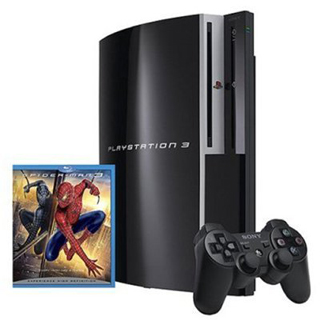
Sony Playstation 3 40GB PS3 Game Console w
As DVD playback made the PlayStation 2 more than just a game machine, hefty multi-media features make the PlayStation 3 an even more versatile home entertainment machine. Features such as video chat, internet access, digital photo viewing, and digital audio and video will likely make it the central component of your media set-up. Still, it is first and foremost a powerful gaming console.
Under the Hood
The PS3 features IBM's "Cell" processor and a co-developed Nvidia graphics processor that makes the system able to perform two trillion calculations per second. That makes the PlayStation 3 40 times faster than the PS2. Along with the traditional AV and composite connections, it also boasts an HDMI (High-Definition Multimedia Interface) port, which delivers uncompressed, unconverted digital picture and sound to compatible high-definition TV and projectors. The system is capable of 128-bit pixel precision and 1080p resolution for a full HD experience. This console also provides for a sound experience by supporting Dolby Digital 5.1, DTS 5.1, as well as Linear PCM 7.1. A pre-installed 40 GB hard disc drive allows you to save games as well as download content from the internet. Unlike the other models of the PlayStation 3, the 40GB does not offer backwards compatibility.
PlayStation 3: T
Features a wireless motion-sensitive controller
Eye of Judgment
Ratchet & Clank Future: Tools of Destruction Blu-Ray Is the New Way
Sony's PlayStation 3 games are encoded onto the Blu-Ray disc media format, which can hold six times as much data as traditional DVDs. This increase in capacity, combined with the awesome power of its processor and graphics card, promises mind-blowing games once developers have learned how to fully harness the new console's power. The PS3 will also support CD-ROM, CD-RW, DVD, DVD-ROM, DVD-R, DVD+R formats.
Sensational Controller
New gamers intuitively move the controller while playing, even though that movement has traditionally had no relation to what's going on in the game. Sony has picked up on this tendency and is using it to bring a new level of control to the PS3. Inside the controller is a high-precision sixaxis sensing system that accurately detects fine movements in pitch, roll, and yaw, as well as three dimensions of movement. This means that future PS3 games will be controlled by the movements of your hands rather than just your thumbs. For example, you might be able to steer a car by holding the controller like a steering wheel.
While the PS3 controller looks much like its Dual Shock predecessors, it will lack the force-feedback vibration since that would only interfere with the sensing system. It uses Bluetooth 2.0 wireless technology and can support wireless controllers. It's a hot-swappable system, so if your controller is running low on power, just pause your game and connect a USB 2.0 cable. You can continue playing while your controller recharges automatically.
A Slew of New Games
A whole host of game publishers back the PS3. Current and future titles for the system, include The Eye of Judgment, Ratchet & Clank Future: Tools of Destruction, Final Fantasy XIII, Metal Gear Solid 4, Devil May Cry 4, Tekken 6, and Heavenly Sword.
Online
Sony has stated that the PS3 will have similar online connectivity and services as the next generation of Xbox Live. Calling it "an always on, always connected device," SCEI's chief technical officer Masa Chatani said the PS3 would be constantly in touch with a "PlayStation World" network "fundamentally based on community, communication commerce, and content." Technically, the infrastructure is there to make that connection. The PS3 supports 10BASE-T, 100BASE-TX, 1000BASE-T Ethernet, as well as IEEE 802.11 b/g wireless networking protocols.
Columbia Pictures Spider-Man 3 (Blu-ray)
Your friendly neighborhood web-slinger is back, only this time his sunny outlook has become partially overcast in the third chapter of director Sam Raimi's Spider-Man saga. Astrange black entity from another world bonds with Peter Parker and causes inner turmoil as he contends with new villains, temptations, and revenge.
Package Includes:
Sony Playstation 3 Game System
40GB Hard Drive
Wireless Controller
Power Adapter
USB Cable
A/V Cable
Ethernet Cable
Manuals
by http://geek-seeker.blogspot.com/

Navigating the city with the iPhone

While most phones are touting their ability to navigate you from place to place by car, it seems that a relatively untapped market is for navigating from place to place by foot.
On a recent trip to NYC I found myself in need of some navigational assistance. Even though NYC is a grid, I’m forever directionally challenged and always find myself walking at least a block in the wrong direction. Enter the iPhone 3G.
I’ve tried to use other mobile phone’s GPS applications in the past but they never seem to be able to map me in real-time the way I need. Thanks to the iPhone and its ability to zoom in and out of the map, as well as overlay with satellite imagery via its built-in Google Maps application, I emerged from the train station, launched the application and was immediately shown not only where I am on the map, but also where I need to go. This led to the most walking I’ve done in the city in a long time. Normally I hop a cab and get shuttled around or take the subway. This time I enjoyed walking 20-30 minutes at a time, all while being directed by my iPhone.
The only drawback I found so far is that the directions aren’t true walking directions. I’m hoping that the functionality appears on the iPhone soon, though, since the web version of Google Maps now features a beta of walking directions.
Fast forward to the future where my calendar communicates to Google Maps on my iPhone and I don’t even have to think about where I’m going to next, or how to get there. It’s definitely getting closer to my vision of the perfect world.
Have you enjoyed a GPS-assisted experience? Share your experience at geekseeker1@gmail.com

 Posts
Posts


